Automated ecommerce testing
Put your store’s shopping journey to the test.
Start with your store URL. ShopPath’s AI shopper follows the path from product selection to checkout entry, then gives you screenshots and issues to review.
No plugin installation. Storefront approval required. No order or payment.
From a URL to evidence
Check the steps a shopper depends on.
An accessible homepage is one part of the journey. Product controls, options and the cart also need to work together. Once your storefront is approved, launch a desktop or mobile browser test. The AI shopper handles navigation; you review the result.
- 01
Storefront
Open the store and find a product.
- 02
Product
Inspect the product page and its visible details.
- 03
Options
Select required options when the product has them.
- 04
Cart
Attempt add-to-cart and inspect the selected item.
- 05
Checkout entry
Try to reach checkout, then stop before customer details or payment.
A restriction or failed step can stop a journey early. Read the full test coverage.
A recorded example
The cart worked. Its product image did not.
In this recorded test, the bottle reached checkout. The separate screenshot review found broken product imagery in the cart views. The journey result and the experience finding answer different questions: could the shopper progress, and what did the captured pages show?
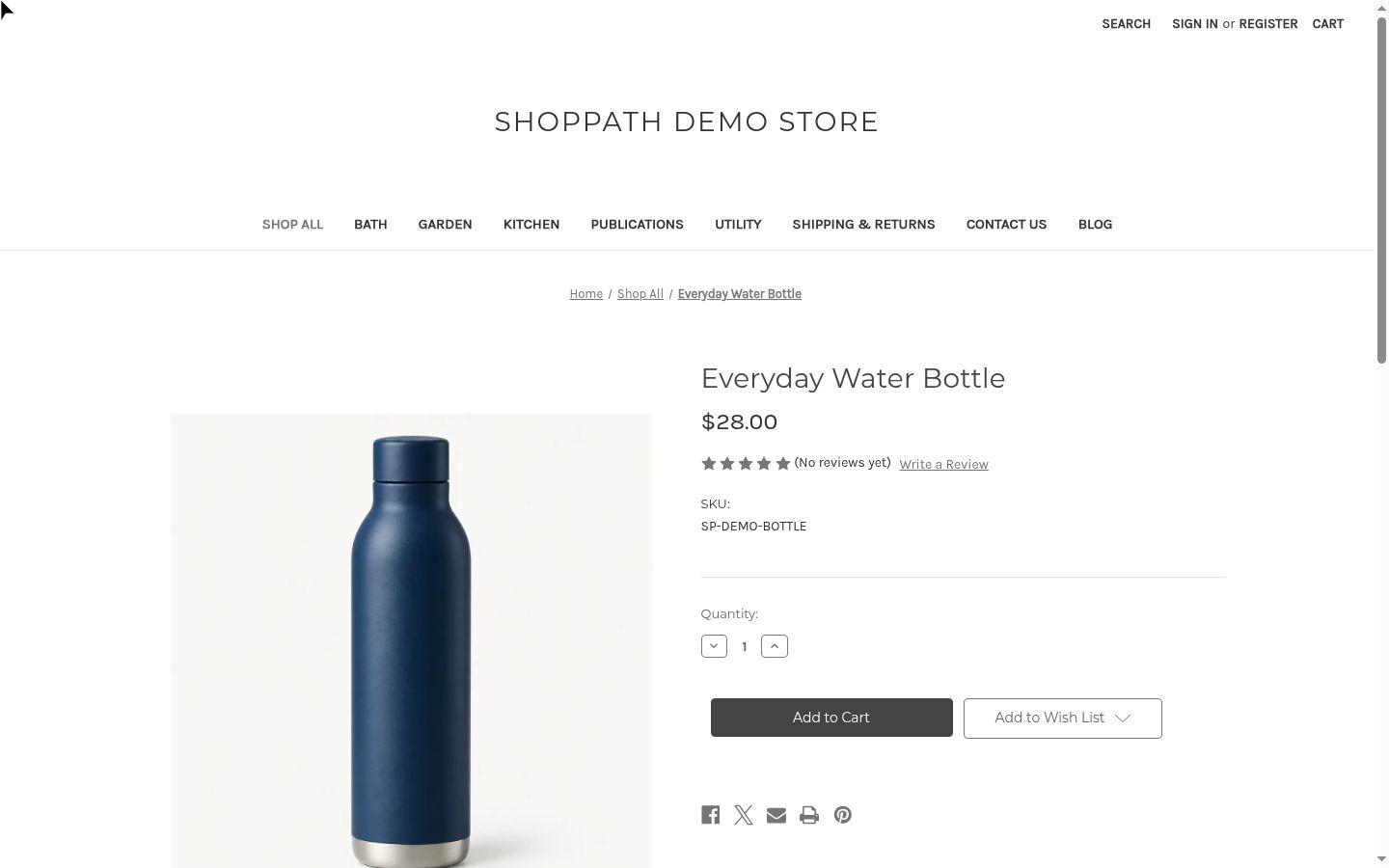
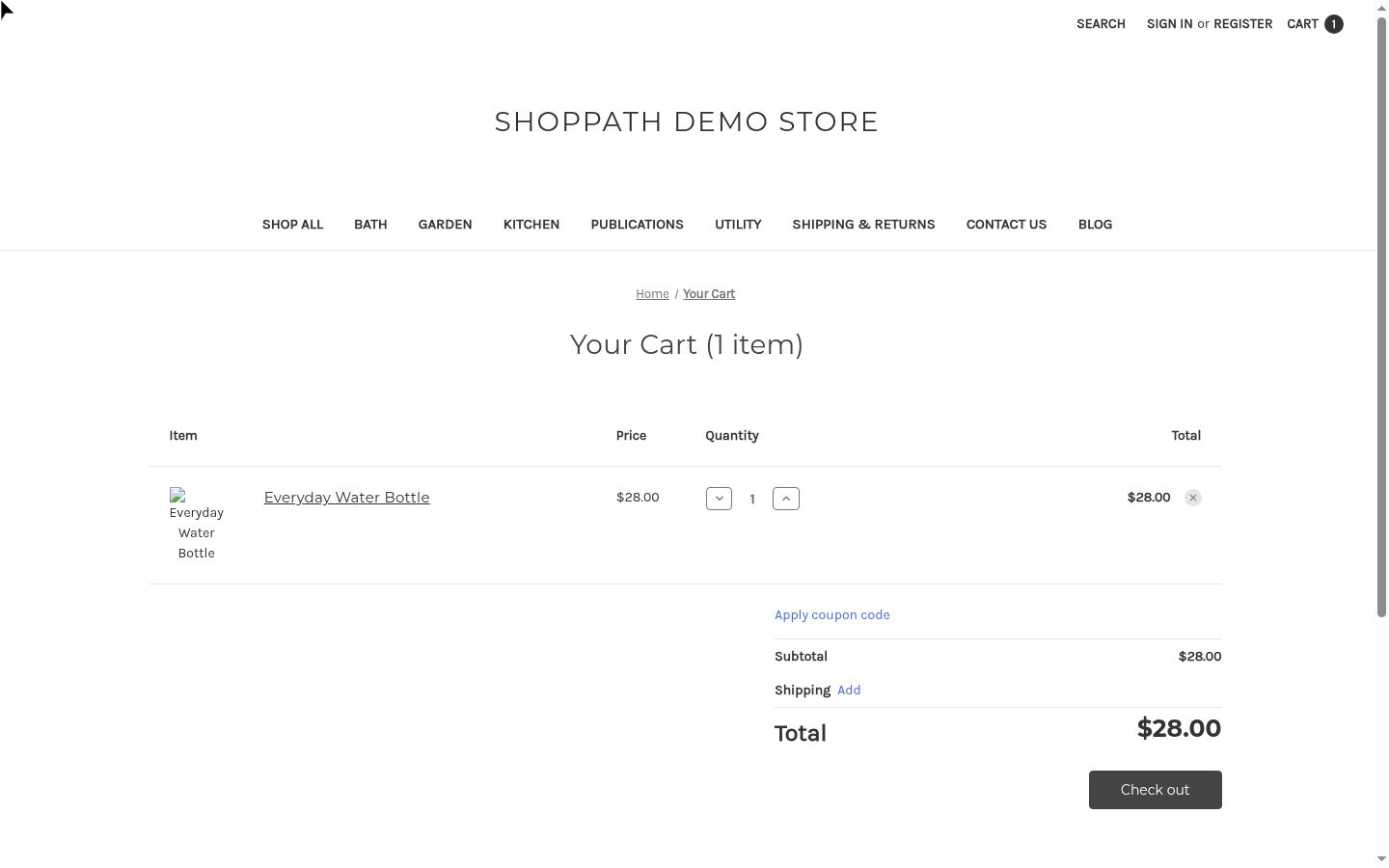
Recorded in our BigCommerce demo store on October 21, 2026. We deliberately introduced the missing cart image to demonstrate detection. This is a demo example, not a customer result. Select a screenshot to inspect it at full size.
Review the finding and its evidence with your team. After making a change, run another test and compare the new screenshots. ShopPath provides findings and suggestions; your team makes the fix.
Build a check into the moments your store changes.
After a theme or app change
Check the published shopping path after a release. Use your platform’s preview tools and manual checks before publishing.
Before sending campaign traffic
Look at a fresh journey report alongside your team’s checks of campaign products, links and promotions.
On a regular schedule
Eligible paid plans support daily or weekly checks within the plan’s journey allowance. Review results as your storefront evolves.
Know what your result covers.
A test follows one encountered shopping path in one browser view. A pass means that path reached the visible start of checkout. It does not certify every product, device or possible issue.
- Checkout boundary. Tests stop before submitting customer details, payment or an order. Payment processing needs a separate platform-specific test.
- Browser views. Choose desktop or emulated mobile. Mobile emulation is not a physical-device test.
- Store access. You must own the store or have permission to test it. Compatibility is reviewed per storefront; access restrictions can prevent completion.
Before your first test
Do I need to install a Shopify or BigCommerce app?
URL-based access does not require a plugin or store-admin credentials. Each storefront needs approval. The BigCommerce app is coming soon; Shopify, WooCommerce and Magento plugins are planned.
Can a passed test still contain a finding?
Yes. The browser journey checks progress toward checkout. A separate screenshot analysis looks for visual and usability issues in the captured pages. Review both parts of the report.
Does ShopPath replace my release checklist?
Use it alongside your release checks. Tests do not validate completed orders, every catalog item, every browser or every possible issue. Your team still reviews changes, checks payment flows separately and fixes problems.